DKNet
DKNet.RandomCreator
Cryptographically secure random string and character generation for passwords, tokens, and other secrets.
✨ Why use it?
System.Randomis the wrong tool for a secret – it is not cryptographically secure and its output is predictable. This package wrapsSystem.Security.Cryptography.RandomNumberGeneratorso a one-time password, API token, temporary secret or invite code is actually safe to hand out.- Two methods, no crypto API surface –
RandomCreators.NewStringandRandomCreators.NewCharsreplace theRandomNumberGenerator+StringBuilderloop you would otherwise write in every project. - Password-strength quotas built in –
MinNumbersandMinSpecialsguarantee a fixed count of digits and symbols in the output, so a “must contain 4 digits and 2 symbols” rule needs no post-generation check. char[]when you need to wipe it –NewCharshands back a mutable buffer you can overwrite after use, instead of an immutablestringthat lingers in managed memory.- Zero dependencies – no
PackageReference, noProjectReference; only the .NET base class library.
It is not a test-data or fixture generator: there is no seeding and no repeatable sequence.
🚀 Quick Start
dotnet add package DKNet.RandomCreator
using DKNet.RandomCreator;

// 25-character random string (default length), letters only.
var token = RandomCreators.NewString();

// 32 characters: exactly 4 digits, exactly 2 symbols, the rest letters.
var password = RandomCreators.NewString(32, new StringCreatorOptions { MinNumbers = 4, MinSpecials = 2 });
🧩 Features
Generate a random string
Returns a random string of the requested length. Saves you from hand-rolling a RandomNumberGenerator + StringBuilder loop every time you need a secret value.
using DKNet.RandomCreator;

string sessionToken = RandomCreators.NewString(32);
Generate a random char[] you can wipe
Same generation logic as NewString, but returns a char[] instead of a string. Useful when you want to overwrite/clear the buffer yourself after use (e.g. sensitive one-time codes) instead of relying on an immutable string that lingers in memory.
using DKNet.RandomCreator;

char[] otpChars = RandomCreators.NewChars(6);
Guarantee a digit quota
StringCreatorOptions.MinNumbers (default 0) guarantees the output contains that many digit characters, drawn from the fixed 10-character digit pool 1234567890. These are exact quotas, not just a floor — see Gotchas & limits below.
Guarantee a symbol quota
StringCreatorOptions.MinSpecials (default 0) guarantees the output contains that many symbol characters, drawn from the fixed 30-character symbol pool !@#$%^&*()-_=+[]{}|;:',.<>/?`~. Combine with MinNumbers to build password-strength rules:
using DKNet.RandomCreator;

var options = new StringCreatorOptions
{
    MinNumbers = 4,
    MinSpecials = 2
};

// 32 characters total: exactly 4 digits, exactly 2 symbols, the rest letters
string strongPassword = RandomCreators.NewString(32, options);
Get letters-only output
There is no dedicated “alphabetic only” flag — it’s implicit. When both MinNumbers and MinSpecials are left at their default of 0 (i.e. new StringCreatorOptions(), or simply omitting options), every character comes from the 52-character letter pool (a-z, A-Z) because that pool is the only one used to fill the remaining length. This is the correct way to get a letters-only string; there is nothing else to configure.
using DKNet.RandomCreator;

// Letters only (a-z, A-Z) — default options already behave this way.
string alphaOnly = RandomCreators.NewString(16);
Shuffle the result so quotas are not clumped
Whatever mix of digits/symbols/letters is generated, the final character order is shuffled with RandomNumberGenerator.Shuffle before being returned — the required digits/specials are not clumped at the start of the string, and the symbol/letter pools are checked for uniform draw frequency in the package’s own test suite (RandomCreatorTests/UniformityTests.cs).
Draw every character from a CSPRNG
All character selection (RandomNumberGenerator.GetItems<char>) and the final shuffle (RandomNumberGenerator.Shuffle) go through System.Security.Cryptography.RandomNumberGenerator — a CSPRNG, not System.Random. This is a verified fact from the source (StringCreator.cs), not a marketing claim.
⚙️ Configuration reference
All options live on StringCreatorOptions, passed as the optional second argument to NewString/NewChars.
| Property | Type | Default | Meaning |
|---|---|---|---|
MinNumbers |
int |
0 |
Exact number of digit characters included in the output, drawn from the pool 1234567890. |
MinSpecials |
int |
0 |
Exact number of symbol characters included in the output, drawn from the pool !@#$%^&*()-_=+[]{}\|;:',.<>/?`~ (30 distinct characters). |
There is no property to customize the character pools, no case-only toggle, and no seed/repeatability option — the package intentionally does one narrow thing.
🧱 Where it fits
Every generated string is assembled the same way — quotas first, letters to fill, then one cryptographic shuffle so the quota characters are not clustered at the front:
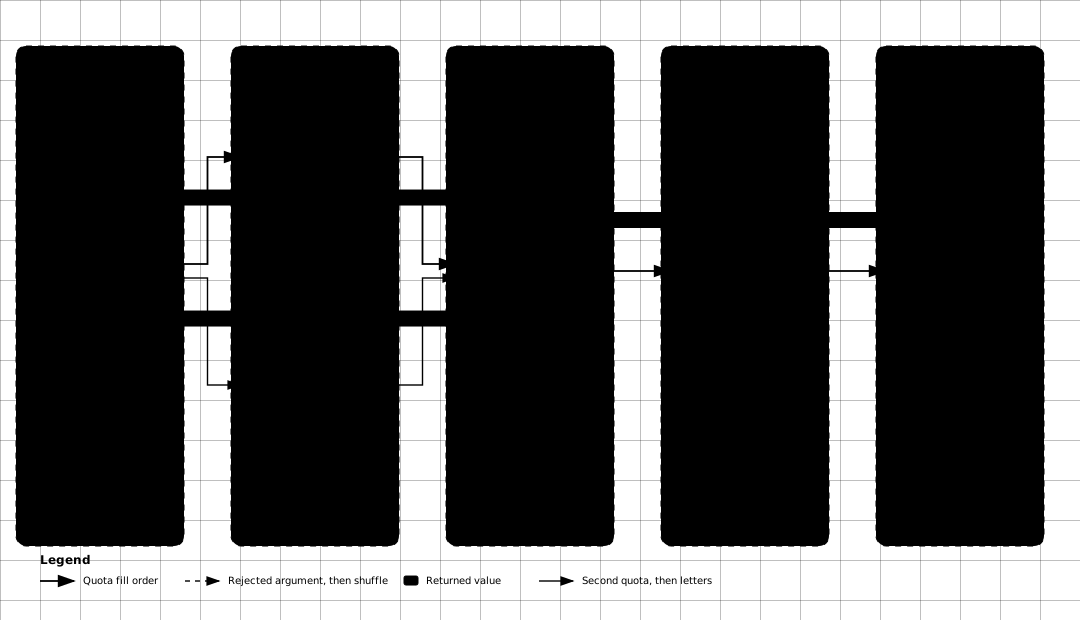
DKNet.RandomCreator is a standalone utility: its .csproj declares no PackageReference and no ProjectReference to any other DKNet package (or any third-party library) — it depends only on the .NET base class library (System.Security.Cryptography). Use it anywhere in a solution, including from other DKNet packages, without pulling in additional dependencies. For application-grade cryptography (AES/RSA encryption, hashing, HMAC) rather than random value generation, use a dedicated encryption package (e.g. DKNet.Svc.Encryption) instead — this package does not attempt that.
⚠️ Gotchas & limits
lengthmust be positive.NewString(0)/NewChars(0)(and negative lengths) throwArgumentException.MinNumbers + MinSpecialsmust be strictly less thanlength. If the sum is>=the requested length, bothNewStringandNewCharsthrowArgumentException— there is no silent clamping. Always leave room for at least one filler (letter) character.MinNumbers/MinSpecialsare exact quotas, not loose minimums. The implementation generates exactly that many digits and exactly that many symbols, then fills the rest of the length using the letter pool only — the filler never adds extra digits or symbols beyond your quotas. In other words, a request forMinNumbers = 5produces exactly 5 digits in the output, never more.- The character pools are fixed — 52 letters, 10 digits, 30 symbols, all declared as
constinStringCreator— and cannot be swapped for a custom alphabet. - Randomness is a genuine CSPRNG (
RandomNumberGenerator), so output is safe to use for secrets; it is not seedable, so results cannot be reproduced for tests — use a fixed literal instead of this generator when a test needs a deterministic value.
🔗 Related packages
- DKNet.Svc.Encryption – reach for it when you need application-grade cryptography (AES/RSA, hashing, HMAC) rather than random value generation; this package does not do that.
- DKNet.Fw.Extensions – the other Core package; reflection, type and DI helpers. Reach for it for everything in this area that is not random value generation.