DKNet
DKNet.Svc.Transformation
Fills bracketed tokens in a template string — [Name], {Email}, <Amount>, {{Ref}} — from
plain objects or string dictionaries by reflection, formatting each resolved value on the way in.
[!IMPORTANT] This page was previously a near-complete fabrication (types like
ICustomConverter,TransformationException, and template syntax such as{amount:currency:USD}never existed in source). Everything below is re-derived fromsrc/Services/DKNet.Svc.Transformationondev— treat any older cached copy of this page as wrong.
✨ Why use it?
- No
string.Replacechains. OneTransform(template, data)call resolves every token in the template against the objects you pass, in order. - The data source can be whatever you already have. A DTO, an anonymous object, an
IDictionary<string, string>, or a collection of those — property lookup is case-insensitive. - Values are formatted, not just stringified. Numbers, dates, and booleans go through a pluggable
IValueFormatter, sotruerenders asYesand1234.5as1,234.50without per-call formatting code. - Your template’s brackets, not the library’s. Square brackets by default; curly, angled, double-curly, or a custom pair are one option away — useful when the template also has to survive another templating layer.
Reach for it when filling human-readable templates: email bodies, notification text, generated document placeholders.
🚀 Quick Start
dotnet add package DKNet.Svc.Transformation
using Microsoft.Extensions.DependencyInjection;

builder.Services.AddTransformerService(); // ITransformerService, transient
public sealed class WelcomeEmailBuilder(ITransformerService transformer)
{
    public Task<string> BuildAsync(User user) =>
        transformer.TransformAsync("Hello [Name], your account [Email] is ready.", user);
}
AddTransformerService(Action<TransformOptions>?) builds one TransformOptions, registers it as
IOptions<TransformOptions>, and registers ITransformerService → TransformerService as transient. It returns
immediately if ITransformerService is already registered — so the first call’s options win and a later call’s
configuration delegate is silently ignored.
🧩 Features
Transforming a template (ITransformerService)
string Transform(string templateString, params object[] parameters);
Task<string> TransformAsync(string templateString, params object[] parameters);
Both overloads extract every token, resolve each one, and rebuild the string in a single pass. TransformAsync differs
only in that extraction runs on the thread pool (Task.Run) — resolution itself is synchronous reflection either way, so
prefer Transform unless you are already on an async path.
var order = new { OrderId = 4711, Total = 129.5m, Placed = new DateTime(2026, 3, 1), Paid = true };
var text = transformer.Transform("Order [OrderId] — [Total] on [Placed]. Paid: [Paid]", order);
// Order 4,711 — 129.50 on 01/03/2026 12.00.00. Paid: Yes
Resolution walks the parameters array in order, then falls back to TransformOptions.GlobalParameters. For each entry:
- an
IDictionary<string, string>is looked up by key, case-insensitively; - an
IEnumerable<object>is searched recursively, item by item; - anything else is treated as an object — a public instance property matching the token name wins, and a non-public one is tried next.
The first non-null value wins.
Token syntax — pick your brackets
Four built-in ITokenDefinition values; any combination can be active at once through
TransformOptions.DefaultDefinitions:
| Definition | Syntax |
|---|---|
TransformOptions.SquareBrackets (default) |
[Token] |
TransformOptions.CurlyBrackets |
{Token} |
TransformOptions.AngledBrackets |
<Token> |
TransformOptions.DoubleCurlyBrackets |
{{Token}} |
services.AddTransformerService(options =>
{
    options.DefaultDefinitions.Add(TransformOptions.CurlyBrackets);
    options.DefaultDefinitions.Add(TransformOptions.AngledBrackets);
});
DefaultDefinitions is add-only (there is no setter) and already contains SquareBrackets, so the square-bracket style
stays active alongside anything you add.
Define your own pair with new TokenDefinition(begin, end) (from DKNet.Svc.Transformation.TokenExtractors) —
it throws ArgumentException for a null or whitespace tag.
A candidate only counts as a token when its inner text is non-empty and contains no character from either tag, so
[Total (USD)] resolves but [a[b] does not.
Unresolved tokens
public enum TokenNotFoundBehavior { LeaveAsIs, Remove, ThrowError } // default: ThrowError
services.AddTransformerService(options => options.TokenNotFoundBehavior = TokenNotFoundBehavior.LeaveAsIs);
ThrowError (the default) throws UnResolvedTokenException on the first token nothing can resolve; (InvalidTokenException is the other exception type in the package — thrown when a TokenResult is constructed from text its ITokenDefinition rejects, which only surfaces if you build custom extractors); LeaveAsIs keeps
the token text verbatim; Remove replaces it with an empty string. A property that exists but holds null counts as
unresolved — there is no way to distinguish “missing” from “null” here.
Value formatting (IValueFormatter)
The default ValueFormatter turns a resolved value into its display string:
public virtual string DateFormat { get; set; } = "dd/MM/yyyy hh.mm.ss";
public virtual string IntegerFormat { get; set; } = "###,##0";
public virtual string NumberFormat { get; set; } = "###,##0.00";
bool becomes "Yes"/"No"; int/long use IntegerFormat; double/decimal/float use NumberFormat;
DateTime/DateTimeOffset use DateFormat; everything else falls back to ToString(). All numeric and date formatting
runs against CultureInfo.InvariantCulture, so output does not shift with the thread’s culture.
Subclass it to change the formats, or implement IValueFormatter for full control, then assign
TransformOptions.Formatter:
public sealed class IsoDateFormatter : ValueFormatter
{
    public override string DateFormat { get; set; } = "yyyy-MM-dd";
}

services.AddTransformerService(options => options.Formatter = new IsoDateFormatter());
Convert receives the IToken as well as the value, so a custom formatter can branch on token.Key when one template
needs a token-specific format.
Public extension points — what you can and cannot replace
The value-resolution surface is only partly open. Check the column before designing against an interface:
| Type | Accessibility | Can you supply your own? |
|---|---|---|
ITokenDefinition / TokenDefinition |
public interface / public sealed class |
Yes — add instances to TransformOptions.DefaultDefinitions. |
IValueFormatter / ValueFormatter |
public interface / public class, Convert and the three format properties are virtual |
Yes — assign TransformOptions.Formatter. |
ITransformerService |
public interface |
Yes — register your own implementation before calling AddTransformerService, which then returns early. |
ITokenExtractor |
public interface, but TokenExtractor is internal sealed |
No — TransformerService builds one extractor per definition itself; there is no property or parameter that accepts an ITokenExtractor. |
ITokenResolver |
public interface, but TokenResolver is internal sealed |
No — TransformerService constructs new TokenResolver() in a field initializer; nothing reads an ITokenResolver from options or DI. |
IToken / TokenResult |
public interface, TokenResult is internal sealed |
Read-only — you receive IToken in a formatter; you never construct one. |
So: to change which text counts as a token, add a definition. To change how a resolved value is rendered,
supply a formatter. To change how a value is looked up, replace ITransformerService outright — there is no
smaller seam.
Global parameters
services.AddTransformerService(options => options.GlobalParameters = [new { CompanyName = "Acme Corp" }]);
Tokens resolve against the call’s own parameters first and fall back to GlobalParameters — the place for values
shared by every template the app renders (company name, support address). With no parameters at all, resolution uses
GlobalParameters only.
⚙️ Configuration reference
TransformOptions, configured in code through the delegate passed to AddTransformerService. There is no
IConfiguration/appsettings.json binding path for this package.
| Option | Type | Default | Effect |
|---|---|---|---|
DefaultDefinitions |
ICollection<ITokenDefinition> (get-only) |
[SquareBrackets] |
Bracket styles recognized; add more, cannot be replaced or cleared through the property setter. |
Formatter |
IValueFormatter |
new ValueFormatter() |
Converts each resolved value to its display string. |
GlobalParameters |
IEnumerable<object> |
[] |
Fallback resolution sources tried after the call’s own parameters. |
TokenNotFoundBehavior |
TokenNotFoundBehavior |
ThrowError |
LeaveAsIs / Remove for lenient rendering. |
🧱 Where it fits
One Transform call runs the whole chain — extract, resolve, format, rebuild — and the two swappable pieces sit
at the ends of it:
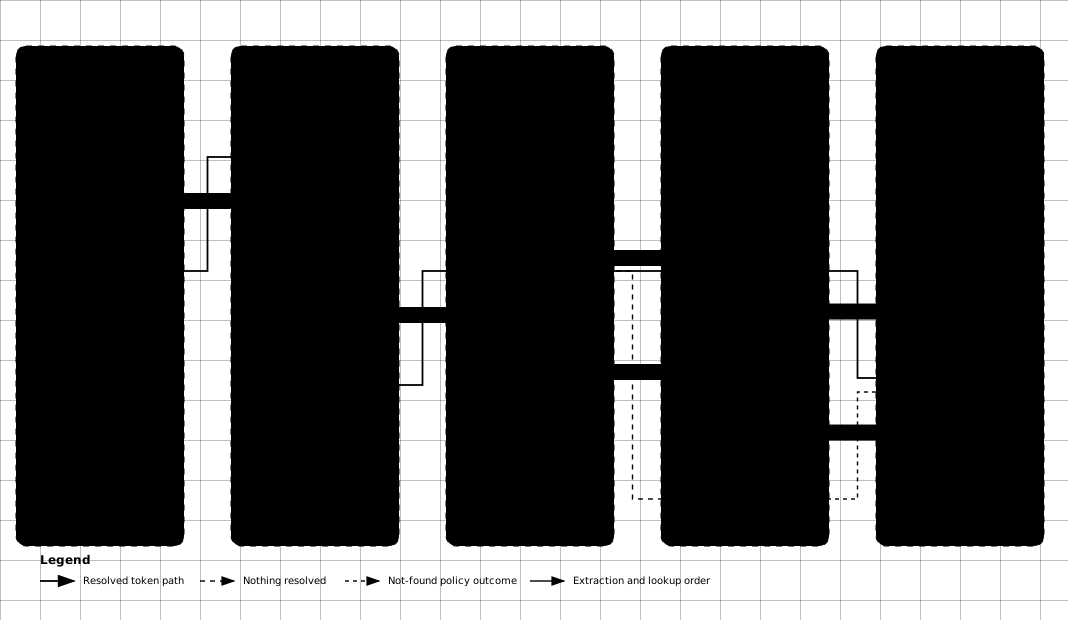
- DKNet.Svc.PdfGenerators — fill a Markdown or HTML template here, then convert the filled result to PDF.
- DKNet.Svc.BlobStorage.Abstractions — store the rendered output, or read the template itself out of blob storage before transforming it.
- Standalone otherwise — the package depends only on the options and DI abstractions, so it is safe to call from a domain service, a message handler, or a background worker.
⚠️ Gotchas & limits
- Resolved values are cached per token text, ignoring the data you pass. The cache key is the token string (e.g.
[Name]), so the sameITransformerServiceinstance reused for a second template returns the first resolution of that token — a second customer’s email would render the first customer’s name. The registration is transient, so a fresh instance per resolution avoids this; never cache or reuse one instance across records, and never register it as a singleton. There is no option to disable the cache (an earlier revision of this page claimed aDisabledLocalCacheoption; it does not exist). - No nested-property or dotted paths.
[Customer.Name]is looked up as a single property literally namedCustomer.Name, which normally fails; flatten your data (project to an anonymous object or dictionary) first. An earlier revision of this page showed[Customer.Name]as a working sample — it does not resolve. - The default date format is 12-hour with no meridiem.
"dd/MM/yyyy hh.mm.ss"renders 13:05 as01.05.00— overrideDateFormat(e.g."HH:mm") for anything a reader must interpret unambiguously. - A dictionary parameter must be
IDictionary<string, string>. Any otherIDictionarythrowsArgumentExceptionduring resolution — includingDictionary<string, object>. - Non-public properties are readable. Resolution falls back to non-public instance properties, so a token can pull a value the type does not expose publicly. Don’t pass entities with sensitive internal state into a user-authored template.
- Overlapping bracket styles are ambiguous. Enabling both
CurlyBracketsandDoubleCurlyBracketsmeans the same text can match two definitions and be substituted twice; pick one of the two. ITokenExtractorandITokenResolverare public interfaces with no injection point. Both implementations areinternal sealed, andTransformerServiceconstructs them itself — implementing either interface compiles but nothing will ever call it. Extend behaviour throughTransformOptions(definitions, formatter, not-found behaviour), or replaceITransformerServiceentirely.- No conditionals, loops, or partials. This is token substitution, not a template engine — reach for Razor, Scriban, or Handlebars if a template needs logic.
🔗 Related packages
- DKNet.Svc.PdfGenerators – reach for it to render the filled template into a PDF.
- DKNet.Svc.BlobStorage.Abstractions – reach for it to read templates from, or write rendered output to, blob storage.
- DKNet.Fw.Extensions – reach for it for the general-purpose string, type, and reflection helpers used across DKNet.