DKNet
Aspire.Hosting.ServiceBus
Hosting integration that adds the Azure Service Bus emulator as a resource inside a .NET Aspire AppHost.
✨ Why use it?
- No shared cloud namespace for local work. Every developer gets their own message broker from the AppHost, instead of pointing at a real Azure Service Bus namespace.
- No hand-rolled
docker run. The image, the EULA acceptance, the SQL Server backing store, the bind-mounted config file, and both endpoints are wired by one call. - Startup ordering is handled. The emulator waits on its SQL Server resource, so you do not add that ordering yourself.
- Fails fast on a broken setup. A
nullresolved connection string throws aDistributedApplicationExceptionduring start-up rather than surfacing later as a confusing runtime connection error downstream.
Reach for it when you want a message-driven workflow — queues and topics defined by a Service Bus emulator config file — running locally under Aspire’s orchestrator alongside the rest of your distributed application.
🚀 Quick Start
dotnet add package Aspire.Hosting.ServiceBus
Reference it from your AppHost project only — like other Aspire hosting integrations, it is consumed by the orchestrator project, not by the services being orchestrated.
The emulator container requires a SQL Server resource as its backing store and a JSON config file
describing the emulator’s namespace/queue/topic topology (the same Config.json format the
Azure Service Bus emulator
itself expects):
using Aspire.Hosting.ServiceBus;

var builder = DistributedApplication.CreateBuilder(args);

var sql = builder.AddSqlServer("sql");

var serviceBus = builder.AddServiceBus(sql, configFilePath: "servicebus-config.json");

builder.AddProject<Projects.Api>("api")
    .WithReference(serviceBus);

builder.Build().Run();
AddServiceBus returns IResourceBuilder<ServiceBusResource>, so it composes with the rest of
Aspire’s fluent builder API (WithReference, WithEnvironment, WaitFor, …) exactly like any
other resource builder.
🧩 Features
AddServiceBus — register the emulator resource
public static IResourceBuilder<ServiceBusResource> AddServiceBus(
    this IDistributedApplicationBuilder builder,
    IResourceBuilder<SqlServerServerResource> sqlServer,
    string configFilePath,
    string name = "AzureBusSimulator")
One call wires up everything the emulator container needs:
- Adds a
ServiceBusResource(aContainerResource) running themcr.microsoft.com/azure-messaging/servicebus-emulator:latestimage. - Accepts the emulator’s EULA automatically (
ACCEPT_EULA=Y) — no separate step to remember. - Points the emulator at your SQL Server resource via the
SQL_SERVERandMSSQL_SA_PASSWORDenvironment variables, takingsqlServer’s name and password parameter automatically instead of you wiring those by hand. - Bind-mounts
configFilePathinto the container at/ServiceBus_Emulator/ConfigFiles/Config.json(read-only), so your namespace/queue/topic topology lives in one versioned JSON file instead of imperative setup code. - Exposes the emulator’s two AMQP ports —
5672(endpointtcp, the primary) and5671(endpointtcp2) — as Aspire endpoints, so other resources discover them the normal Aspire way. - Calls
WaitFor(sqlServer), so the emulator only starts once its SQL Server backing store is ready. - Subscribes to Aspire’s
ConnectionStringAvailableEventfor the resource and throws aDistributedApplicationExceptionif the resolved connection string ever comes backnull.
ServiceBusResource — the resource type
ServiceBusResource is a sealed ContainerResource implementing IResourceWithConnectionString,
so it works with any Aspire API that consumes connection-string resources (WithReference, health
checks, …):
ConnectionStringExpression— builds the emulator connection string:Endpoint=sb://{PrimaryEndpoint.Host};SharedAccessKeyName=RootManageSharedAccessKey;SharedAccessKey=SAS_KEY_VALUE;UseDevelopmentEmulator=true;If aConnectionStringRedirectAnnotationhas been applied to the resource (via Aspire’s own redirection support), that redirected resource’s expression is used instead — letting you swap the emulator for a real Service Bus namespace’s connection string without changing anything downstream.PrimaryEndpoint— anEndpointReferenceto the emulator’s primary (AMQP) endpoint, used to build the host in the connection string above and available if you need to reference it directly.GetConnectionStringAsync(CancellationToken)— resolves the connection string asynchronously, honouring the same redirect annotation asConnectionStringExpression.
⚙️ Configuration reference
| Parameter | Required | Default | Effect |
|---|---|---|---|
sqlServer |
yes | — | The SQL Server resource the emulator uses as its backing store; the emulator waits on it before starting. |
configFilePath |
yes | — | Host path to the emulator’s Config.json (namespaces, queues, topics, subscriptions) — bind-mounted read-only into the container. |
name |
no | "AzureBusSimulator" |
The Aspire resource name for the emulator. |
There is no fluent API on ServiceBusResource for declaring queues or topics in code — that
topology is entirely the responsibility of the JSON file passed as configFilePath. The image
registry, name, and tag (mcr.microsoft.com/azure-messaging/servicebus-emulator:latest) and both
endpoint ports (5672, 5671) are fixed by the extension and are not configurable through
parameters.
🧱 Where it fits
One AddServiceBus call adds the resource on the left and everything inside the boundary; you still supply
the SQL Server resource and the config file:
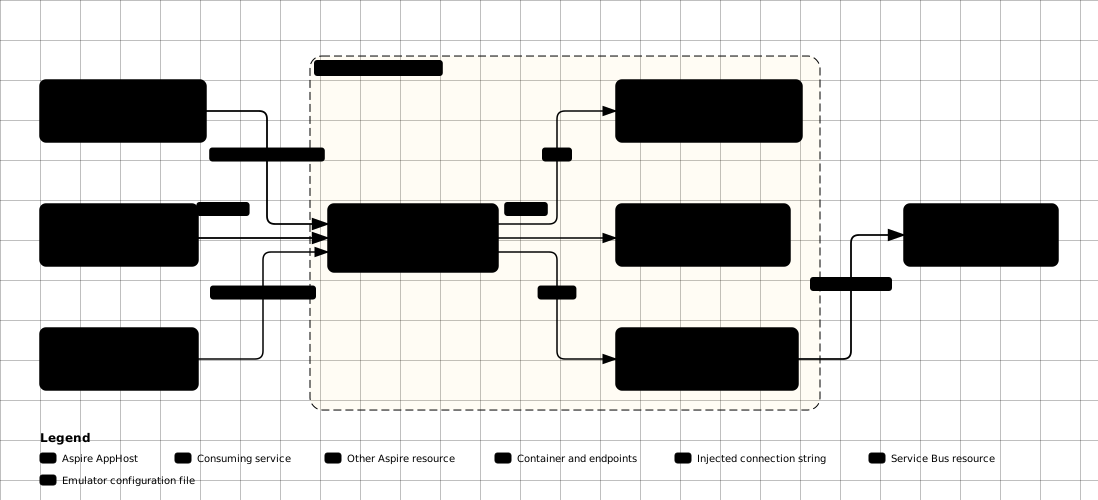
Aspire only provisions the transport; message handling still runs through
DKNet.SlimBus.Extensions. Once you have wired
WithReference(serviceBus) onto a downstream project, that project resolves the connection string
the normal Aspire configuration way and hands it to SlimMessageBus’s own Azure Service Bus provider
(SlimMessageBus.Host.AzureServiceBus) — using the emulator locally and a real Azure Service Bus
connection string in higher environments, with no change to handler code.
⚠️ Gotchas & limits
- Emulator only. The extension always provisions the
azure-messaging/servicebus-emulatorcontainer — there is no built-in path to have it provision or reference a real Azure Service Bus namespace. Point production configuration at a real connection string outside this package (or useConnectionStringRedirectAnnotationto redirectServiceBusResourceto another resource’s connection string). - SQL Server dependency is mandatory. The Service Bus emulator image itself requires a SQL
Server backing store;
AddServiceBusalways requires aSqlServerresource and always waits on it — there is no way to run the emulator without one. - Topology lives outside the fluent API. Queues, topics, and subscriptions are defined in the
emulator’s
Config.json, not through builder methods — if you are looking forWithQueue/WithTopic-style calls, they do not exist in this package. - No health-check wiring.
AddServiceBusdoes not register an Aspire health check for the resource; add one yourself if you need readiness gating before dependent services start. - Fixed ports and image tag. The emulator always runs the
latesttag on host ports5672/5671; there is no parameter to pin a specific image version or remap ports, so two emulator instances in one AppHost would collide on those ports.
🔗 Related packages
- DKNet.SlimBus.Extensions — the SlimMessageBus integration that consumes the transport this resource provisions; reach for it in the API/worker projects, not in the AppHost.
- DKNet.SlimBus.Generators — source generators for the handler/endpoint surface those projects expose.